
On Hand™iPhone • iPad • iPod Touch
Featuring support for Bluetooth barcode scanners, and fully optimized for iPad and Android tablets as well! |
 |
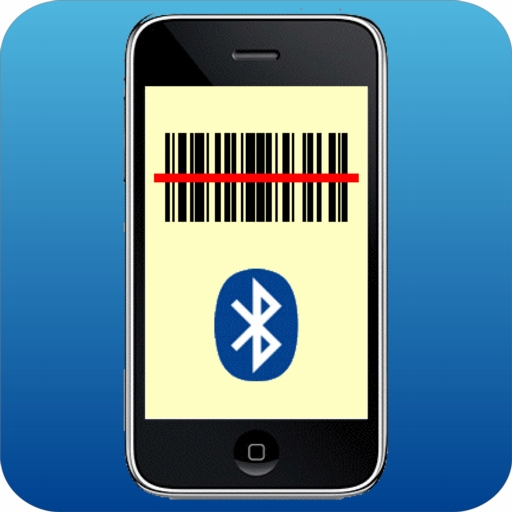
Use your iPhone, iPad, iPod Touch, or Android device to perform inventory data collection, track assets, pack orders for shipment, generate restocking orders, and more. Use inexpensive handheld Bluetooth barcode scanners like the CHS 7C from Socket Mobile or the CS3070 from Motorola, capture barcodes using the built-in camera of your iPhone, iPod Touch, or iPad, or simply select items by hand without using barcodes at all. And if you want to test out the barcode scanning capability before you buy, we have a low-cost "lite" version called SCS Scan BT as well (iOS only). For Android, there is a trial version called On Hand Lite you can download.



Here's a summary of the features you'll find in On Hand™:
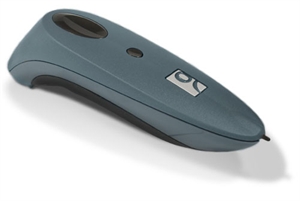 Barcode scanning using low-cost handheld Bluetooth barcode scanners — capture all one-dimensional (1D) barcodes.
- Barcode capture using the built-in camera [iPhone/iPad version only; not supported on Android] — recognizes UPC-A, EAN-13 (including BOOKLAND), and CODE128 barcodes.
- Input barcodes manually
- Quick and easy counting - repeatedly tap an item to increment the count, or use a built-in calculator to change counts by larger amounts. Counts can be whole numbers or decimal fractions.
- Information for each item includes quantity, barcode, name, note, named location, and date/time the item was created and last modified.
- Flexibile input and output - Read and write simple text files via iTunes file sharing [iOS], SDCard [Android], Dropbox™, email, clipboard [iOS], or web (ftp for output, http for input).
- Full Dropbox support including uploading output files to Dropbox, and selecting input files from a list of available files.
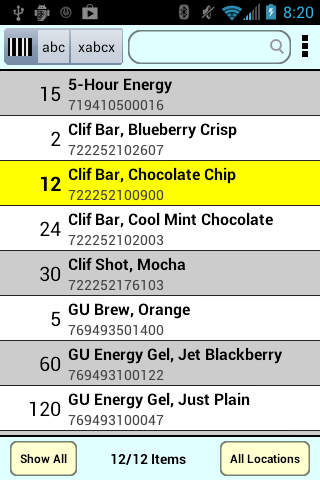 User-configurable input and output - specify exactly which elements of information should be input and output for each item, in what order, whether the elements are separated by tabs or commas, and the desired line ending character for proper use with Mac, Windows, or Unix computers
- "Pick and pack" mode for shipping applications by setting scan action to decrement instead of increment count – when the count of each item reaches zero, the order is fully packed.
- Restocking mode by preloading desired stocking levels and setting scan action to decrement instead of increment count – when the inventory is done, the counts show the amounts to be reordered and the order can simply be sent out straight from the application.
- Multi-location mode lets you take inventory at multiple locations before uploading data, or pack multiple orders from a single downloaded file. Add separate notes (serial number, condition of item, etc.) for each item for each location.
- Scan with or without check digits, allowing the scan to match your preloaded inventory barcodes. Even use a special filter to pick out only certain digits from barcodes. Optionally convert BOOKLAND barcodes to ISBN numbers.
- Multiple display modes: Display all items, or only those with counts >0, <0, =0, or ≠0.
- Multiple sort options: Sort items by barcode (alphanumeric or numeric ordering, by name of the item, or in the order the data were collected).
- Search items by barcode or by name, and when searching by barcode, a "default barcode" makes it easier to search in cases where the first digits of the barcodes in your database are all the same, and only differ starting in, e.g., the tenth digit. For name searches, search either at the start of the name only, or anywhere within the name.
- Runs on iPhone, iPod Touch, and iPad running iOS 4.0 or higher or Android running Android 2.2 or higher.
- Fully optimized for iPad and Android tablets, including providing on-screen barcodes for scanning quantities [iPad only].
- Localized in Spanish, French, and German [iOS only].
Praise for the new Android version "Best Scanner with Inventory tracking available. I have used On Hand for Palm OS for at lest 10 years with support from Stevens Creek. Great program/ app. by people who are devoted to quality and support for what they sell. Data can be used so easily with export and import." "Multi purpose scanner app Ideal for inventory as well as a mobile order app. "Location" is used for identifying the customer and items scanned are sent by e-mail for processing (direct import to the company's sales system). We are using Motorola CS 3070 bluetooth scanner and the database imported to the app contains nearly 30 thousand items. Support from the developer is quick and professional. They have been extremely helpful regarding versions on both Ipad and Android. App has been in use for over 6 months on several Ipad's. Very happy to see this app available on Android devices as well. I have tried different inventory/scanner apps, and this is by far the best!" |
Want to see if the barcode recognition capabilities of the software are suitable for your needs, or if the software is compatible with a particular Bluetooth barcode scanner that you already have?
The "lite" version of the software, SCS Scan BT, is available for precisely that purpose. It features all the capability of On Hand with the single exception that it does not provide output capability. For Android, the "lite" version is called On Hand Lite and features two limitations: it works for only one week, and it only allows you to output a maximum of five items.
Want to learn more?
- Read the complete On Hand manual here (iOS) and here (Android) or download the manual as an eBook here (iOS only). You'll find many screen shots in the manual which will give you a good idea of the "look and feel" of the software.
- Read about our other software for iPhone, PalmOS, Android, Mac, and Windows here
About Stevens Creek Software:
Stevens Creek Software has been developing software for Windows, Macintosh, Palm, iPhone, and Android since 1988. We have been a leading developer of software for the Palm platform, and are now one of the leading developers of software for iPhone, with ten different titles on the market.
Stevens Creek Software
P.O. Box 2126
Cupertino, CA 95015

Click "Recommend" to let your Facebook friends know about On Hand: