The Scanning-Optimized Database Software
for the Palm Computing Platform
featuring Catalog Scanning, Database Collection, and Report Generation
Imagine what you could do if you could download up to 32 different catalogs
(databases) each containing up to 32 fields and up to 32,767 records into
your Palm, Symbol SPT, or Handspring Visor, and quickly look up information
in those catalogs manually or by barcode scanning. Imagine what you could
do if you could generate databases for data collection on the fly, and
upload that data to your desktop in simple text files. Imagine what you
could do if you could select information from the databases on your handheld
unit and generate reports in formats you design, and send those reports
to the printer, the memo pad, your email outbox, or the Palm clipboard.
Imagine no more! CatScan is here,
and its the tool you need! And it works on any Palm handheld device! Want
to take advantage of barcode scanning for database lookup and/or data
collection? CatScan works with the
standalone Symbol SPT units, and also with the Symbol CSM150 and PSC Momentum
plug-in scanner modules for the Handspring Visor .
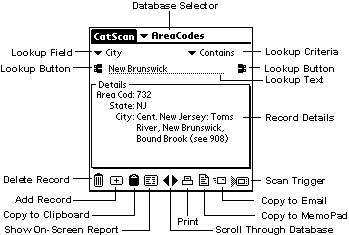
Lookup information in any field of the catalog, using "equals",
"starts with", or "contains" criteria.
Lookup information by manual input, or simply by barcode scanning
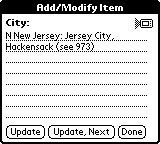
All details of a record displayed in a scrolling list on screen; any one piece of
information can be tapped on for a close-up view.
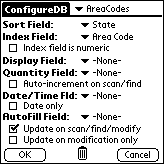
Designate a variety of special fields for special functions:
Designate one "sort" field to sort the database, and to provide
rapid lookup on that field.
Designate a second field as an index field, so that information other than
the sort field, such as the barcode, is "indexed" for equally rapid search
and find. Most Palm database programs don't include this feature, but when your databases
contain thousands of items, it's essential unless you want to waste a lot of time
searching.
Designate a field to automatically popup when you scan an item - perfect
for "price check" or similar applications, or have the quantity field pop
up if you are using the software for inventory applications.
Designate a field to be automatically filled in with fixed information (like
an account number, a room number, etc.) when you scan a series of items.
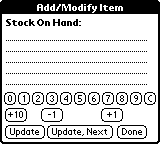
Designate a field as a quantity field, to be automatically incremented whenever
you scan an item. A series of buttons makes it a breeze to modify quantities when
you display that field, and yes, non-integer quantities are allowed!
Designate a field to record date or date and time as items are looked up
or modified in the catalog.
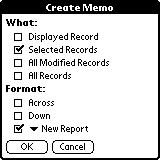
Generate reports containing all the entries in your catalog, currently selected
entries, all the modified entries, or just the currently displayed entry. Horizontal
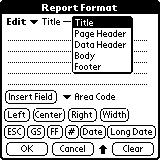
and vertical formats of the data are automatically included, and you can also create
up to 32 custom report formats, each containing a page header, a data header,
a body, and a footer, using any of the fields in your database (by name) as well as
other special functions including date, special ("control") characters,
justification control, and more! Report formats are saved in the Palm MemoPad so they
can be easily beamed from one unit to another.
Reports can be printed (requires a copy of PalmPrint software, sold separately), sent to the MemoPad,
emailed (using iMessenger on the Palm VII or Mail on other Palms), or copied
to the Clipboard for pasting into other applications.
After you upload data to the desktop, automatically run a script which can
do anything you want with the uploaded data - notify someone by email, copy the data
to a remove server, printed, etc. (you need to write the script yourself; CatScan simply runs it, so what you can do is limited only
by you).
More Information...
Want to learn more about CatScan?
We've tried to keep this page simple, but the complete manual for CatScanis part of the download when you download the software (see below). Even
if you don't have a Palm, there are plenty of screen shots, so you can see everything
the software can do, and how easy it is to use.
Want to try CatScan yourself?
You can download CatScan and put
it through its paces without a Serial Number (password). The handheld
software is fully functional without a serial number, but when you HotSync
the data, only the first five items in any data you collect will be transferred
to the desktop, and in addition, the software will expire in 14 days.
This should allow you to fully evaluate what CatScan
can do for you and your business. Download now.
Want to learn more about PalmOS handhelds?
Our software runs on the Palm operating system (PalmOS). PalmOS is developed by PalmSource, and is licensed for use on handheld devices made by palmOne (including the Treo, Zire, and Tungsten lines), Handspring (now part of palmOne), Sony, Symbol (some models), Kyocera, Samsung, and others. A complete, current list of licensees, with links to their respective websites, can be found here.
CatScan
is enhanced to take advantage of barcode-scanning capability, which means that if you have a PalmOS handheld equipped with a barcode scanner, the software will operate even more efficiently (although it definitely works without barcode scanning on "normal" PalmOS handhelds). There are a variety of options for barcode scanning using PalmOS handhelds; you can read all about them here.
CatScan runs on all PalmOS handhelds running PalmOS 3.0 or higher.
Who we are...
Stevens Creek Software has been developing and marketing software for Macintosh, Windows, DOS, PalmOS, and iPhone (iOS) since 1988. We specialize in handheld solutions, with more than 20 titles for PalmOS and iOS. Learn more...
Ready to order?
Single Licenses
You can license a single copy of CatScan for $99.95.
Most users download the software from our Web site and pay for the software online; for a small charge we can send
you the software on a disk via regular mail instead. You can order online or by mail.
Stevens Creek Software
P.O. Box 2126
Cupertino, CA 95015
We accept most
credit cards (online ordering only). If you wish to order by mail, contact us via email so that we can calculate the total cost of the software plus shipping charges. Let us know if you also wish to receive the software on a mailed CD. Payment is by check or money order drawn from a U.S. affiliated bank in U.S. funds. Mail orders will take a considerably longer time than payment and delivery online.
Need Multiple Copies?
For multiple copy pricing and methods of ordering, click here.